

AshlandLocation
824 US-42 Ashland, OH 44805
419-289-3610

Open today at 8am

  • View all hours
    • Monday 8am to 5pm
      Tuesday 8am to 5pm
      Wednesday 8am to 5pm
      Thursday 8am to 5pm
      Friday 8am to 5pm
      Saturday 8am to 12pm
      Sunday Closed all day
exterior medina
6080 Norwalk Rd. Medina, OH 44256
330-725-4951

Open today at 8am

  • View all hours
    • Monday 8am to 5pm
      Tuesday 8am to 5pm
      Wednesday 8am to 5pm
      Thursday 8am to 5pm
      Friday 8am to 5pm
      Saturday 8am to 12pm
      Sunday Closed all day
Wellington
625 South Main St. Wellington, OH 44090
440-647-3725

Open today at 8am

  • View all hours
    • Monday 8am to 5pm
      Tuesday 8am to 5pm
      Wednesday 8am to 5pm
      Thursday 8am to 5pm
      Friday 8am to 5pm
      Saturday 8am to 12pm
      Sunday Closed all day
Open today at 8am
Wellington Implement, Ohio

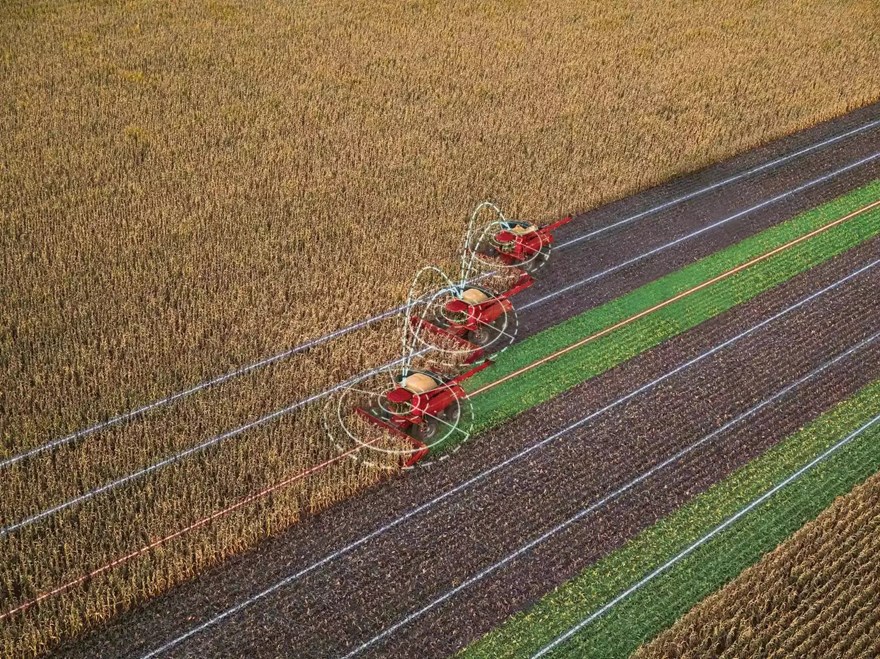
Case IH AccuSync

Model Photo

Connect the Fleet. In the Field.

Work smarter, not harder. AccuSync connects multiple machines in a field to ensure operators are working together efficiently by sharing coverage maps and A/B guidance lines for all seasons of use.

With AccuSync, you can:

  • Enable section control based on operation coverage at the field level.
  • Gather more accurate data on tillage, planting, seeding, nutrient application, spraying and harvest.
  • Ensure parallel passes by all equipment.
  • Provide accurate yield maps where less than-full swath is used.
  • Avoid skips and control overlaps.
  • Save money on costly inputs – Automatically prevent overseeding in previously planted areas.
  • Time is of the essence, AccuSync allows operators to share information and get more done throughout the day.


  • Get a Quote
  • Send to a Friend
  • Payment Calculator
  • Get A Quote

    Fields with asterisks* are required. Please email our helpful staff with any questions or comments using the contact form.

    Send To A Friend

    Fields with asterisks* are required. Your friend will receive an email that contains a reference to this page. Please send this email only to people you know who would be interested in this information.

    Loan Calculator

    Use the Loan Calculator to help you determine the financing and payment options that are best for you.

    Amount Financed ($)
    Interest Rate (%)
    Loan Term in Months
    Monthly Payment Calculated

    **The accuracy of this calculator and its applicability to your circumstances is not guaranteed. You should obtain personal advice from qualified professionals. This information is provided for illustrative purposes only and does not constitute an application. This notice does not guarantee loan approval, nor is it an offer or commitment to make a loan to you on the above terms.


Features

Setup

Less Downtime Means More Productivity

AccuSync makes setup a breeze and ensures maximum uptime when you pull into a field. Easily share guidance and coverage information with other operators while increasing productivity through real-time data sharing. There’s no longer a need for in-person line-of-sight on vehicles or constant radio chatter. Plus, you’ll save time and money on your high-value inputs.

Connectivity

Monitor Equipment Anywhere, Anytime

Integration – Starting with Model Year 2019 and newer machines, AccuSync is fully compatible with most Case IH equipment utilizing 4G Case IH hardware (PCM) and the Pro 700 display (back to tier 4A) and is compatible with equipment with Pro 1200 displays. Plus, with the power of FieldOps™, aggregate, sync, and visualize data from multiple machines operating in a single field and use those insights for future planning.

Display Compatibility:

  • Pro 1200 to Pro 1200
  • Pro 700 to Pro 700 Plus
  • Pro 700 Plus to Pro 700 Plus
  • Pro 700 Plus to Pro 1200

Contact your local Case IH dealer for information on acquiring a subscription to AccuSync.

Collaborative Field Tasks

How to Join a Job

First, ensure you have an AccuSync subscription, and all equipment is in the same FieldOps account.

Second, when in the field, the lead machine creates a new job and selects the boundaries and swaths to share.

Third, the other machines open AccuSync within the toolbox (Pro 700/Pro 700 Plus) or operations screen (Pro 1200), find the applicable job, and join.